

EzyScan Solution
Proof Of Delivery
Signed, GPS-tagged proof for every delivery, captured in seconds.
Built for companies running their own deliveries — no dispatch overhead, just scan, sign, and ship the data straight to the office.
What is EzyScan POD?
Paperless Proof Of Delivery for Your Own Fleet
EzyScan – Proof Of Delivery is designed for companies who perform their own deliveries and do not require job dispatch, but need an easy-to-use app to capture products delivered in any unit of measure (barcoded or non-barcoded), time, date, GPS, and a signed proof of delivery from the receiver.
The hosted back-end provides office staff with a clear view of completed deliveries. Full reporting and direct database access enables integration with accounting and ERP systems.

What the Driver Sees in the Field
A clean, button-driven flow on the Zebra handheld — built so a new driver can run a route after a few minutes of training.
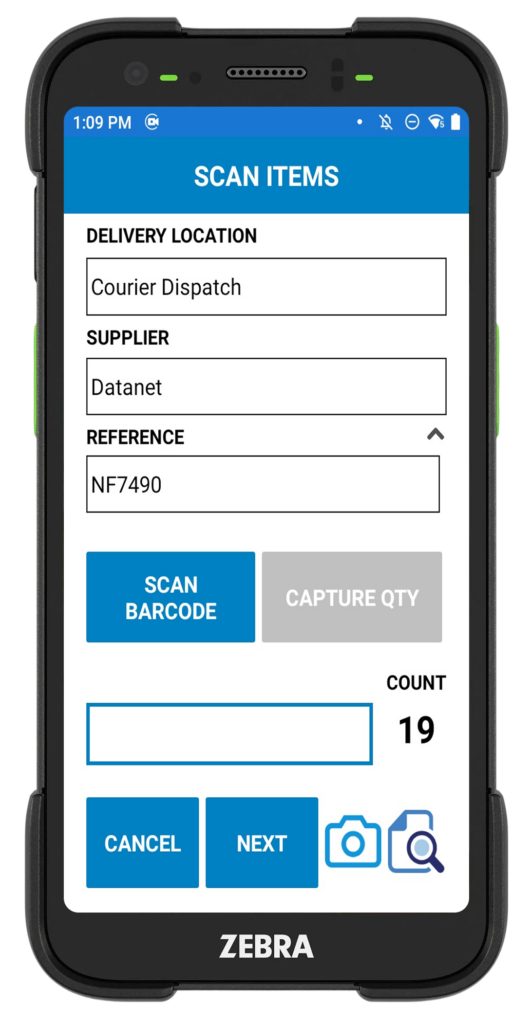
Scan Items Set delivery location, supplier and reference, then scan barcodes or capture a quantity by unit of measure.

Review Before Sign Receiver sees an itemised summary on the device — every reference, quantity and barcode — before they sign.
How It Works
From Depot to Signed Docket in Four Steps
Office Sets the Route
Admin allocates customers, suppliers, units of measure and stop codes from the hosted back-end.
Driver Loads & Scans
Driver opens the Android app, selects the delivery, scans items or enters quantity by UOM.
Receiver Signs
Receiver reviews on-screen, signs on the device, and GPS, date and time are stamped automatically.
Sync Deliveries As Required
Driver triggers a sync when coverage allows — completed deliveries batch-upload to the back-end, ready for reporting and invoicing.
Hosted Back-End
Total Control From the Office
- ✓ Delivery Locations Maintain your full customer and drop-point list in one place.
- ✓ Suppliers Add 3rd party supplier records for deliveries you fulfil on someone else's behalf.
- ✓ Units of Measure Define UOMs for any product — boxes, pallets, litres, kilos, items.
- ✓ Stop & Cancellation Codes Standardise driver reasons so reporting stays clean and comparable.
- ✓ Routes Allocate customers to routes and control who sees what on the road.

Delivery Reports Customers Will Accept
Run delivery reports using a number of filters — view what was delivered, who signed, GPS co-ordinates, quantities and more.
Produce a clean, customer-friendly PDF report straight from the back-end to settle queries fast and feed straight into your invoicing process.
Inside Every Report
- Items delivered with quantity & UOM
- Receiver's name and on-screen signature
- GPS co-ordinates of delivery point
- Date and time of every transaction
- Reason codes for stops and cancellations
- Filterable by driver, customer, route or date
- Exportable PDF + database access for ERP feeds
Ready to retire the paper docket?
Talk to us about your Proof Of Delivery requirements and we'll walk you through a live demonstration on your own routes.

